
Rioace Casino Login and Registration
Rioace Casino burst onto the scene in 2023, and honestly, it’s been making waves ever since. Operated by Altacore N.V. and licensed by Curaçao (No. OGL/2023/109/0075), we’ve built a platform that combines style, security, and entertainment. Our leopard mascot lounging on his throne isn’t just for show. He’s watching over 12,000+ games from 70+ top providers, making sure every spin, bet, and win feels just right.
If you’re considering joining us, here’s why thousands of players have already leaped:
- Massive welcome package: 400% bonus up to €2200 plus 350 free spins across your first five deposits
- Huge game library: Over 12,000 games, including slots, live casino, table games, and crash games
- Daily cashback: Get up to 35% of your losses back every single day
- VIP program: 30 levels with exclusive perks, personal managers, and unlimited withdrawals
- Flexible payments: Cards, e-wallets, and a wide range of cryptocurrencies
- Mobile-friendly: Play directly in your browser on any device
- 24/7 support: Live chat and email assistance whenever you need it
Now, let’s walk through how to get started at Rioace, step by step.
Registration at Rioace Casino
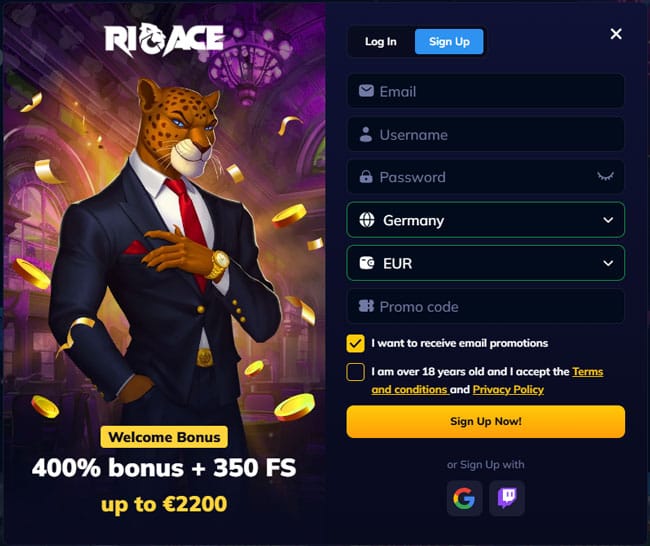
Getting started at Rioace is quick and painless. We designed our Rioace casino sign up process to be straightforward, so you can get to the fun part faster. You’ll find the registration button in two spots: at the top right of the homepage or on the left sidebar. Both work the same way.
Step-by-Step Registration Process
Step 1: Basic Information
Click the Sign Up button, and you’ll see a registration form. Here’s what we need from you:
- Email address (make sure it’s valid – you’ll need it for verification)
- Username (pick something memorable)
- Password (make it strong – mix letters, numbers, and symbols)
- Country (select your location from the dropdown)
- Currency (we support 18 options, including EUR, USD, AUD, BTC, ETH, LTC, USDT, DOGE, and more)
- Promo code (optional, but if you have one, this is where it goes)
Before you hit that final button, you’ll need to tick two boxes: confirming you’re over 18 and agreeing to our Terms and Conditions and Privacy Policy. We recommend actually reading those, by the way. They’re there to protect both you and us.
Want a shortcut? You can skip the form entirely and register using Google or Twitch. Just click the corresponding icon, authorize the connection, and you’re in. It takes about 10 seconds.
Step 2: Complete Your Profile
Once your account is created, you’ll land inside your personal cabinet. Don’t stop there. Head to your profile settings and fill in the remaining details:
- Full name (first and last)
- Phone number (with country code)
- Date of birth (this confirms your age)
- City and full address
- Postal code
- Gender
This information is crucial for verification later, so make sure everything matches your official documents. Typos here can cause headaches down the line when you try to withdraw your winnings.
What Happens Next?
After completing registration, you’re ready to explore. Browse our game library, check out the welcome bonus details, or dive straight into demo mode to test games without spending a cent. But if you’re planning to make a deposit and play for real money, you’ll need to complete verification first. More on that in a bit.
Login and Personal Cabinet at Rioace
Once you’ve registered, logging in is simple. Head to the Rioace casino login page and enter your credentials.
How to Log In
You have three options for accessing your account:
- Email or Username + Password: Enter the email address or username you chose during registration, along with your password. Hit the Login button, and you’re in.
- Google: Click the Google icon, select your account, and authorize access.
- Twitch: Same deal – click the Twitch icon and connect.
One quick tip: save your password somewhere secure. A password manager works great for this. If you’re the type who forgets passwords (no judgment), you’ll appreciate having it stored safely.
Forgot Your Password?
It happens. If you can’t remember your Rioace login details, click the “Forgot password?” link on the login page. Enter your registered email address, and we’ll send you a reset link. Follow the instructions in the email, create a new password, and you’re back in business.
Exploring Your Personal Cabinet
Once logged in, your personal cabinet is your command center. Here’s what you can do inside:
| Feature | What It Does |
| Profile Settings | Update personal details, change password, manage communication preferences |
| Deposit & Withdraw | Add funds to your account or cash out your winnings |
| Bonus Store | Browse and activate available bonuses |
| Transaction History | View all deposits, withdrawals, and bets |
| Verification | Upload documents for KYC compliance |
| VIP Progress | Track your VIP level and rewards |
| Favorites | Save your go-to games for quick access |
We built the cabinet to be intuitive. Everything is clearly labeled, and navigation is smooth. If you ever get stuck, our live chat team is just a click away.
Verification at Rioace Casino
Let’s talk about verification. It’s not the most exciting part of online gaming, but it’s essential. We’re required by law to verify your identity before processing withdrawals. Think of it as a security measure that protects both you and us from fraud.
Why Verification Matters
Verification (also called KYC – Know Your Customer) serves several purposes. It confirms you’re of legal gambling age, prevents money laundering, and ensures your winnings go to the right person. Licensed casinos like Rioace can’t operate without these checks, so it’s non-negotiable.
Documents You’ll Need
We require three types of documents for full account verification:
- Proof of Identity (POI): Government-issued ID such as a passport, driver’s license, or national ID card. The document must be valid (not expired) and show your full name, date of birth, and photo clearly.
- Proof of Address (POA): A recent document (dated within the last 90 days) showing your full name and residential address. Accepted options include utility bills, bank statements, or government correspondence.
- Proof of Payment Method: Evidence that you own the payment method used for deposits. For cards, upload a photo showing the last four digits and your name (cover the middle digits for security). For e-wallets or crypto, a screenshot showing your name and account details works.
How to Submit Documents
Log in to your account and click on your profile icon. Navigate to the Verification tab, where you’ll see three sections: Identity, Address, and Payment Method. Upload clear, color images or PDFs of your documents in the appropriate sections. Make sure all four corners of the document are visible and that the text is legible.
Once submitted, our team reviews your documents. This usually takes 24-48 hours, though it can be faster depending on volume. You’ll receive an email confirmation once your account is verified.
Tips for Smooth Verification
- Upload documents early, even before your first deposit. This avoids delays when you want to withdraw.
- Ensure your account details match your documents exactly. Mismatches cause rejections.
- Use high-quality images. Blurry or cropped photos slow down the process.
- If your document is rejected, check your email for feedback. We’ll tell you exactly what’s wrong and how to fix it.
For verification-related questions, contact our dedicated KYC team at KYC@Rioace.com. They’re fast, helpful, and used to handling these requests all day.
Customer Support at Rioace
We’re proud of our support team. Seriously. They’re available 24/7, speak multiple languages, and genuinely care about solving your problems.
How to Reach Us
You have three main ways to contact support:
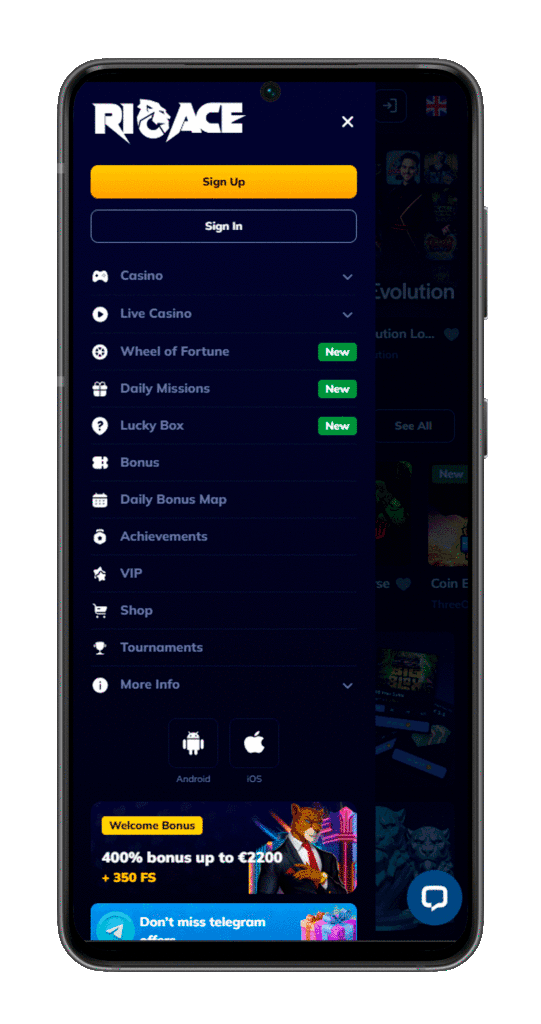
- Live Chat: Click the yellow chat button at the bottom of any page (desktop) or in the left menu (mobile). Enter your name and email, and you’ll be connected instantly. Live chat is the fastest option for urgent issues.
- Email: Send your question to support@Rioace.com. We aim to respond within a few hours, though complex inquiries might take a bit longer.
- KYC Email: For verification-specific questions, use KYC@Rioace.com. This goes directly to our verification team.
What to Expect from Support
Our support team speaks English, German, Italian, Polish, Portuguese, Finnish, Greek, Lithuanian, and Latvian. We’ve trained them to handle everything from bonus questions to payment issues to technical glitches. When you contact us, have your username ready. It speeds up the process.
We also maintain a detailed FAQ section. It covers the most common questions about bonuses, payments, and account security. Before reaching out, give it a quick look – you might find your answer instantly.
Common Problems and Solutions
No platform is perfect. While we strive to make Rioace as smooth as possible, occasional hiccups happen. Below are the most common issues players encounter and how to fix them.
Can’t Log In
This is frustrating, we know. Here’s a quick troubleshooting checklist:
- Double-check your credentials: Are you using the correct email or username? Is Caps Lock on? Try typing your password into a text editor first, then copy and paste it into the login field.
- Clear your browser cache and cookies: Sometimes old data interferes with login. Clear your cache, restart your browser, and try again.
- Try incognito mode: Open a private/incognito window and attempt to log in. This bypasses cached data and extensions that might be causing issues.
- Update your app or browser: If you’re using the mobile version, make sure your browser is up to date. Outdated software can cause compatibility problems.
- Check your internet connection: Weak or unstable connections can prevent login. Switch to a stronger network or restart your router.
If none of these work, contact support. There might be an account-level issue we need to resolve on our end.
Email Verification Link Not Arriving
After registration, you should receive a verification email. If it’s not showing up:
- Check your spam folder: Email filters sometimes flag casino messages as spam. Look in Promotions, Junk, or Spam folders.
- Wait a few minutes: Emails can take 5-10 minutes to arrive during high-traffic periods.
- Resend the email: On the login page, click “Didn’t receive a confirmation email?” and enter your email address. We’ll send a fresh link.
- Verify your email address: Make sure you entered it correctly during registration. A single typo means the email goes nowhere.
Still nothing? Contact support@Rioace.com, and we’ll manually verify your account.
Deposit Not Showing Up
You deposited funds, but they’re not in your account. Before panicking, check these:
- Transaction time: Crypto and e-wallet deposits are usually instant, but card transactions can take a few minutes. Bank transfers take longer – up to 5 days in some cases.
- Minimum deposit: Our minimum is €20. If you deposited less, the transaction might be rejected.
- Payment method issues: Check with your bank or payment provider. Sometimes they block gambling transactions without notifying you.
- Wrong account: Did you log into the correct account? If you have multiple accounts (which violates our terms), you might have deposited into the wrong one.
If your deposit is delayed beyond the expected timeframe, contact support with your transaction ID or receipt. We’ll investigate and sort it out.
Can’t Withdraw Funds
Withdrawal issues are usually tied to verification or bonus terms. Here’s what to check:
- Account verification: You must be fully verified before withdrawing. Check the Verification tab in your cabinet.
- Wagering requirements: If you claimed a bonus, you need to meet the wagering requirements before cashing out. Check your bonus progress in your account.
- Minimum withdrawal: Our minimum withdrawal is €20. Amounts below this can’t be processed.
- Payment method mismatch: We require you to withdraw using the same method you deposited with (or a closely related one). This is an anti-money-laundering rule.
For persistent withdrawal issues, email support or KYC@Rioace.com. We’ll review your account and explain what’s blocking the payout.
Games Not Loading
If games aren’t loading properly:
- Check your browser: We recommend using the latest version of Chrome, Firefox, or Safari. Outdated browsers cause compatibility issues.
- Disable ad blockers: Ad blockers can interfere with game scripts. Try disabling yours temporarily.
- Clear cache and cookies: Old data can corrupt game files. Clear your cache and reload the page.
- Try a different device: If games won’t load on desktop, try mobile (or vice versa). This helps identify device-specific issues.
- Test demo mode first: If a particular game isn’t working, try it in demo mode. If the demo works but real money doesn’t, contact support.
Still stuck? Let us know which game is causing trouble, and we’ll investigate with the provider.
Account Restricted or Locked
Sometimes accounts get locked due to security concerns or suspected policy violations. If this happens:
- Check your email: We always send an explanation when we restrict an account. Look for messages from support@Rioace.com.
- Contact support immediately: If your account is locked, only our support team can unlock it. Provide your username and any relevant details.
- Verify your identity: We might ask for additional documents to confirm you’re the account owner.
Most lockouts are resolved quickly once we verify everything is legitimate.
Conclusion
At Rioace Casino, we’ve built a platform designed for players who want variety, security, and fun. Our registration and login processes are streamlined to get you into the action fast, while our verification protocols ensure your winnings are protected. With 24/7 support, a massive game library, and generous bonuses, we’re confident you’ll enjoy your time here.
Remember, verification is your friend. Complete it early, keep your documents handy, and you’ll never face delays when cashing out. If you run into any issues along the way, our support team is always ready to help. We’re not just a casino – we’re a community of players, and we want everyone to have a smooth, enjoyable experience.
Our leopard is waiting on his throne. Ready to join him? Register today and see what Rioace is all about.

FAQ
Registration takes about 2-3 minutes if you fill out the form manually. If you use Google or Twitch for quick sign-up, it’s even faster – around 10 seconds. After registration, you’ll need to complete your profile and upload verification documents, which can take an additional 5-10 minutes depending on how quickly you gather your documents.
No, multiple accounts are strictly prohibited. Our terms and conditions allow only one account per player. If we detect duplicate accounts, all of them will be closed, and any funds or bonuses will be forfeited. Stick to one account to avoid complications.
If you’ve relocated and can’t log in, contact our support team at support@rioace.com. Some regions have restrictions, and we’ll need to verify your new location. Have your account details and proof of address ready. Depending on licensing restrictions, we might need to adjust your account settings or, in rare cases, inform you if we can’t service your new location.
For security reasons, you can’t change your email address directly in the cabinet. Contact our support team via live chat or email, and they’ll guide you through the process. You’ll likely need to verify your identity with documents before we can update your email. This prevents unauthorized account changes.
We don’t charge fees on our end for deposits or withdrawals. However, your payment provider (bank, card issuer, or crypto wallet) might charge their own fees. Check with them before transacting. Also note that some payment methods process faster than others – crypto and e-wallets are usually instant, while bank transfers can take up to 5 days.
If you forget your username, don’t worry. You can log in using your registered email address instead. If you’ve forgotten both, contact our support team. They’ll ask security questions or request identifying documents to verify your identity before recovering your account details. Keep your registration email in a safe place to avoid this hassle!


